
Free · Open source · Self-hosted
Type a topic.
Get a Short.
TubeMatic is a video factory your AI coding agent runs. It researches the topic, writes the script, voices it, animates every scene in code and renders a vertical video. You approve each step from a dashboard on your own machine, and nothing goes out without your yes.
How it works
From a topic to a posted Short
The agent does the work. You make three calls, placed where they matter most: before research turns into work, before money gets spent, and before anything goes public.
- TOPIC_PROPOSED
Find a topic
Topics come from a curriculum you seed, from what’s trending, or from one you submit on the New Video page. Each gets a producibility score, and anything under 5 is turned away.
- You
You approve the topic
Approve or reject it from the dashboard’s Pipeline page.
- SCRIPT_READY
Write the script
The agent writes the script beat by beat. Give it a script profile and it writes in your style, learned from your own YouTube videos.
- You
You approve the script
Voicing is the only spend that can’t be refunded, so nothing gets voiced until you say yes.
- VOICING
Voice it
ElevenLabs reads the script, and every word gets a timestamp so the captions land on the beat.
- VOICE_READY
Write the scenes
The agent generates the imagery and writes a React component for every scene. The whole project is typechecked before a single frame renders.
- RENDERING
Render
Remotion and Chromium render a vertical 1080×1920 mp4 at 30 fps, usually 90 to 180 seconds long.
- VIDEO_READY
Watch it back
Gemini watches the finished video for defects. Any finding sends it back to the agent to fix, so only a clean video reaches you.
- You
You approve the video
Watch it in the dashboard, then approve it or send it back for a revision.
- PUBLISHED
Post it
Download the mp4, or let TubeMatic post to YouTube, Instagram, TikTok and Facebook, now or on a schedule. Publishing stays off until you turn it on, and the agent can never publish by itself.
Want it hands-off? Turn on Auto Pilot for the projects you pick. TubeMatic then approves its own topics, scripts and videos, and posts them on the spacing you set. It’s off until you turn it on.
The dashboard
Every call is one click
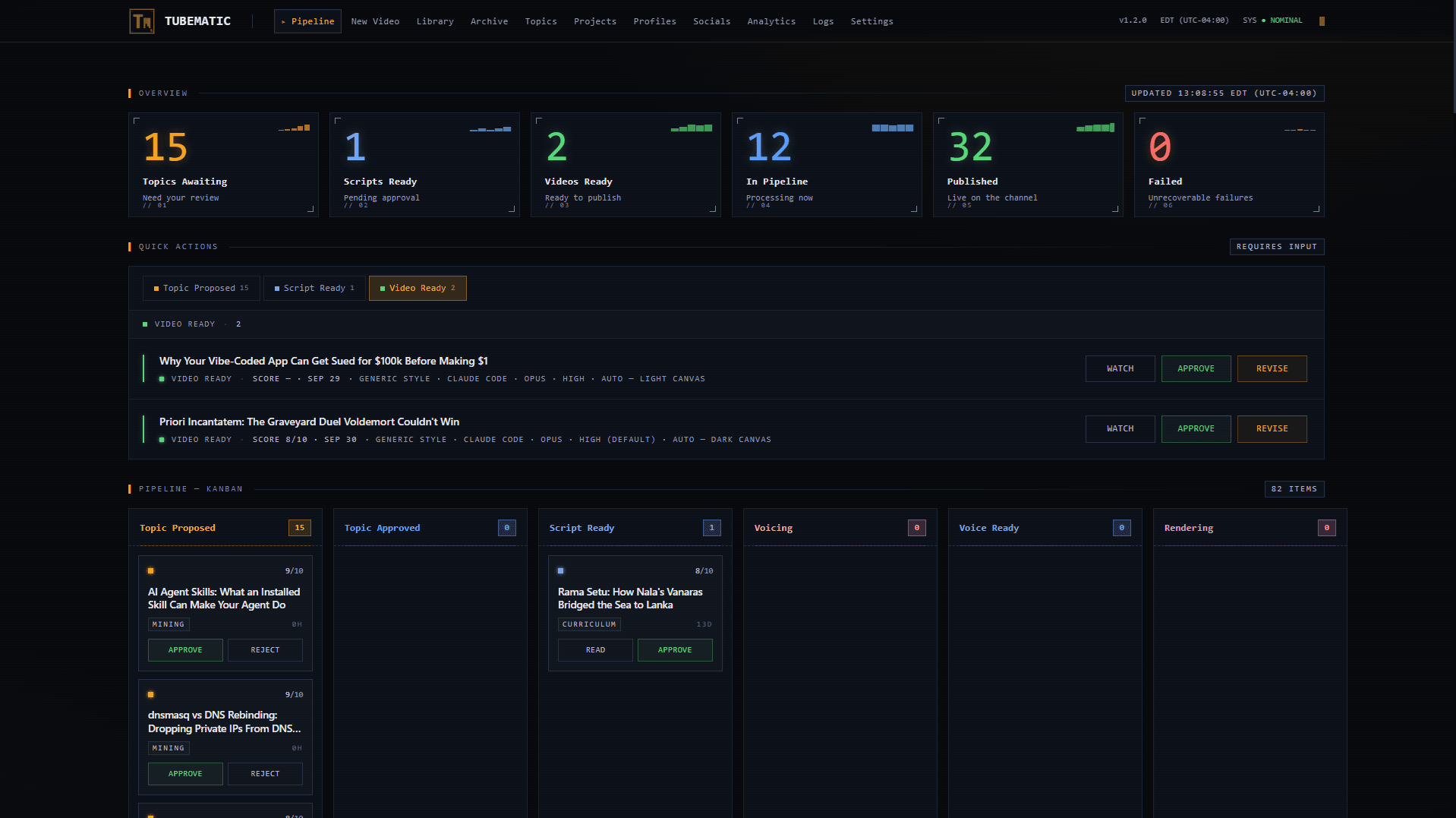
Everything waiting on you sits at the top of the Pipeline page: read the script, watch the video, then approve it or send it back. Library, Analytics, Socials, Logs and Settings are a tab away, all running on your own machine.
- Overview
- What’s waiting on you, what’s in flight, what’s live.
- Quick actions
- Every topic, script and video that needs a decision, with Watch, Approve and Revise.
- Kanban
- Each video moving through the pipeline, one column per status.
Under the hood
Every frame has source code
TubeMatic doesn’t fill in templates. The agent writes a React component for each scene of each video, and Remotion renders it. When a review sends a video back, the agent edits real code, and you can read exactly what produced any frame.
import { AbsoluteFill, Easing, interpolate, useCurrentFrame } from "remotion";
import { Captions, Node, Packet, Wire } from "../components";
// Written by the agent for this one video.
const CLIENT = 0.27, SERVER = 0.65;
const packets = [
{ label: "SYN", from: CLIENT, to: SERVER, at: 150 },
{ label: "SYN-ACK", from: SERVER, to: CLIENT, at: 200 },
{ label: "ACK", from: CLIENT, to: SERVER, at: 250 },
];
export const Handshake: React.FC = () => {
const frame = useCurrentFrame(); // 320
const open = frame >= 300;
return (
<AbsoluteFill className="bg-ink">
<Node label="Client" y={CLIENT} appearAt={10} />
<Node label="Server" y={SERVER} appearAt={40} />
<Wire from={CLIENT} to={SERVER} drawFrom={84} solid={open} />
{packets.map((p) => {
const t = interpolate(frame, [p.at, p.at + 45], [0, 1], {
easing: Easing.inOut(Easing.cubic),
extrapolateLeft: "clamp",
extrapolateRight: "clamp",
});
return <Packet key={p.label} label={p.label} y={p.from + (p.to - p.from) * t} />;
})}
<Captions timeline="timeline.json" />
</AbsoluteFill>
);
};
How TCP says hello
A scene written the way TubeMatic writes them, running on the same frame as its source.
The setup
Your machine. Your agent. Your accounts.
- Agent
- Claude Code · Codex · OpenCode
- Runs on
- Your machine, in Docker
- Voice
- ElevenLabs
- Review
- Gemini
- Render
- Remotion + Chromium
- Output
- 1080×1920 · 30 fps · 90–180 s
- Posts to
- YouTube · Instagram · TikTok · Facebook
- Price
- Free and open source. Bring your own API keys.
Made with TubeMatic
See more of what TubeMatic makes
The official TubeMatic channels, run by the developer who builds it. They post Shorts made with TubeMatic.
Free and open source.
Coming soon to GitHub.
TubeMatic is getting its last coat of paint before the public release. The repository opens here soon, so stay tuned.
Repository opening soon